LEAD Function in SQL Server

LEAD Function in SQL Server
The LEAD function is used to access subsequent row data along with current row data. This function was introduced in SQL Server 2012. Using this function is easy to compare values in the current row with values in the subsequent row. The syntax for LEAD function is,
LEAD([scalar_expression], offset, default_value)
OVER([partition_by_clause] [order_by_clause])
In LEAD function partition_by_clause is optional, order_by_clause is required.You can specify any number of columns in the order_by_clause. The offset denotes the number of rows to lead. The default_value to return if the number of rows to lead goes beyond first row in a table or partition. If the default_value is not specified NULL is returned.
In order to achieve this we are going to use "tbl_EmployeeDetails" table for our demo.
CREATE TABLE [dbo].[tbl_EmployeeDetails](
[Id] [bigint] IDENTITY(1,1) NOT NULL,
[Employee] [varchar](450) NULL,
[Salary] [decimal](18, 0) NULL,
 CONSTRAINT [PK_tbl_EmployeeDetails] PRIMARY KEY CLUSTERED 
(
[Id] ASC
)WITH (PAD_INDEX = OFF, STATISTICS_NORECOMPUTE = OFF, IGNORE_DUP_KEY = OFF, ALLOW_ROW_LOCKS = ON, ALLOW_PAGE_LOCKS = ON) ON [PRIMARY]
) ON [PRIMARY]
GO
-- insert some sample data
insert into tbl_EmployeeDetails(Employee,Salary) values('Michael',25000);
insert into tbl_EmployeeDetails(Employee,Salary) values('Stuart',14000);
insert into tbl_EmployeeDetails(Employee,Salary) values('Stella',28000);
insert into tbl_EmployeeDetails(Employee,Salary) values('Kennedy',30000);
insert into tbl_EmployeeDetails(Employee,Salary) values('Dona Thomas',26000);

insert into tbl_EmployeeDetails(Employee,Salary) values('Kraig',32000);
So our table will look like this,
Now, Lets see how to use LEAD function in a SELECT statement,
select *,
LEAD(Salary) OVER(ORDER BY Id) as LeadSalary
from tbl_EmployeeDetails
Notice that we haven't specified the offset and default value in the above statement. If you don't specify the offset by default it will take as 1, If you don't specify the default_value it will return as NULL like you can see in the below result set.
Suppose, If you want to lead the result set based on the descending order of the Id, your query should be like this:
select *,
LEAD(Salary) OVER(ORDER BY Id DESC) as LeadSalary
from tbl_EmployeeDetails
The returned result is,
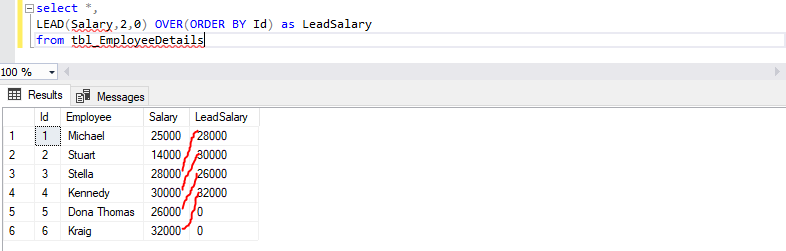
In order to lead with different offset and default value. your SELECT statement should be like this:
select *,
LEAD(Salary,2,0) OVER(ORDER BY Id) as LeadSalary
from tbl_EmployeeDetails
In above statement the value 2 denotes the lead offset it will lead two rows from the current row. The 0 indicates the default value.
The statement returned result is,
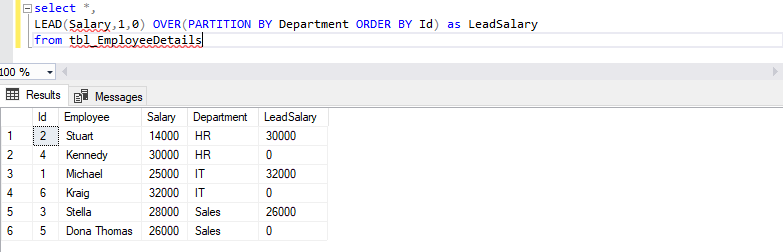
Now, Lets see how to use partition_by_clause in LEAD function?
In order to achieve this we have included department in the employees table based on the department we are going to partition the result set.
select *,
LEAD(Salary,1,0) OVER(PARTITION BY Department ORDER BY Id) as LeadSalary from tbl_EmployeeDetails
The returned result is,
The partition_by_clause divides our department and produces the LeadSalary based on the offset and default value.


Comments